Showing posts with label WPF. Show all posts

Thursday, July 23, 2015

WPF is dying - Time to focus on HTML+Javascript+CSS based desktop development

"Long long ago when browsers were only used to show documents and text delivered from servers, there was a technology called Silverlight which was released by Microsoft to compete with another technology called Flash. Flash was used to add some flashy animations into static web contents and to play video and audio files..."

This must be a story I will be telling to my son when he wants me to tell technology stories. As everybody knows Silverlight is now dead though Visual Studio 2015 is still giving project template. I was one of the developers who learned and developed from the very first preview version of Silverlight itself. Also successfully run a blog called Silverlighted Web and earned so much money with my Silverlight skill. What caused SL to die? 

It was simple as the gap was filled by HTML5. Silverlight / other RIA technologies were kind of workaround to achieve Rich Internet Apps because HTML, till 4th version was just for content / document markup, not for applications. Once HTML5 came with capabilities to develop applications , obviously RIA technologies were all dead including Silverlight, Flash etc...At least in case of Flash , Adobe announced officially and provided migration to HTML5. MSFT is still not announced SL is dead.

When HTML5 arrived, smart people foresee the death of Silverlight and moved to HTML5. But there were still people who believed SL will live longer and MSFT will invest on it because their Azure Portal was using Silverlight. Microsoft is a group of smarter people than us and all of a sudden they launched their Azure portal in HTML5 and slowly ditched Azure SL portal.

Lets come back to WPF. There were speculations on WPF is going to die when Microsoft first announced that we can build Windows 8 desktop apps using HTML5 & Javascript. There were people who argued MSFT won't kill WPF because Visual Studio & Expression Blend are built using WPF. There is a road map published in .Net MSDN blog as well. According to me there are less chances that anybody will maintain a technology only because of one product.

Yes, Microsoft cannot rewrite Visual Studio using other technology between 2 versions as its desktop application and there are many plugins out there. It was different with Silverlight based Azure portal as it was web, single instance and nobody had written plugin on top of it.

Am I telling that Visual Studio is rewritten using some other technology which eventually kill WPF

Yes it is happening, but as small pieces here and there. First Visual Studio Online came. We can use it to manage our TFS projects. We can do all most all the project management activities which we were doing from VS desktop app. Only thing pending is writing code, compiling & debugging. People can argue VS desktop is for coding and debugging only. So what is the problem?

The big thing happened during the Build 2015. MSFT announced something called Visual Studio Code. What is it and what is it for WPF?

According to wiki, it is a source code editor for Windows and Linux and OS X. What is the distance between source code editor and IDE? Its simple as Compile, Run and Debug capabilities. That can be done using VS Code also. They says its "Code Editing. Redefined". Why they call it as VS Code? Why the existing Visual Studio is not enhanced to 'redefined code editing'? Why they are calling it as VS Code, a separate name? Is it only because, it can run on other operating systems such as Linux and OS X.

According to me, MSFT is once again showing that HTML+Javascript+CSS is the future by introducing a Electron based Visual Studio. Don't get shocked on hearing the new redefined code editor aka Visual Studio from MSFT is based on Electron  which is an open source cross platform technology for desktop application development using web technologies(HTML,Javascript) from Github which depends on Chromium. Yes the same technology powering Chrome browser from Google.

Electron has high degree of customization (hackable to the core) as an editor. Chromium is really stable with its multi process model. Its all proven and now we can see, VS Code download link in the VS 2015 page.

Is there any more proof required to understand, HTML5 based VS Code will replace existing WPF based Visual Studio? We probably will see VisualStudio online providing us a web page where we can write code, compile and debug in next 5 years along with its current project management features.

Will .Net platform survive the boom of Javascript and Microsoft's journey to become hosting company? Will write another post on the same

This will be my last post on this WPF technology blog. This is the blog I will surely write posts on WPF as and when I encounter interesting scenarios. But those will be published in my General Technology Blog.

Joymon v/s Code

Don't argue that I am writing all these because I want to focus only on one blog. It doesn't make any difference posting here or there.

Wednesday, July 18, 2012

Index - Important WPF concepts & features

Recently, I came across a scenario where I had to explain the WPF features to one person. I didn't get a common place where I can see a list of all WPF features. Now I would really like to call this as WPF cheat sheet where I can brush up my WPF skills.
The sad thing I could forecast is, as the WinRT model becomes popular and available in different platforms such as WinRT tablets, surface, windows mobile, Windows 8, future OS and other devices etc...,WPF will decline to desktop computers and rest in history. After naming the tablet as Surface, it seems Microsoft is trying to bring single platform for all devices under the Surface brand same as Google did using Android. Hope you got why I wrote this index post.

Friday, February 24, 2012

MVVm - Embed C# code in XAML like ASP.Net MVC

It is long time since I posted something in this blog. I know this is my most famous blog with average 200hits/day but I was mainly concentrating into the other aspects of .Net such as CLR, WCF, ASP.Net, Windows Phone 7 etc than this XAML based display technology. There are 2 main inspirations for this post.

First one is a comment which I got on my post related to opacitymask and its usage in WPF. The specialty of that is, it came from a MSFT guy. I don't know how others are thinking, but for me its little important. Even I am not sure whether that MSFT is just something else or that person just added MSFT :-)

The second reason is "This is my 100th post on WPF technology and I want that to be something special and useful". I was in search for such a topic and just found today, while I was working with ASP.Net MVC 3 application.

The problem
Anyway I am not wasting time on introduction.Lets come to the topic. As everybody knows MVVm is the widely accepted pattern for the XAML based technologies such as WPF and Silverlight. The main reason I could see is the data binding support. By design the pattern is not expecting anything in the code behind and everything related to business should reside in the viewmodel. Its all fine.We can have data binding and commands to separate the view from vm. But what can I do with the dialogs? Since they are UI is that desirable to call showdialog from viewmodel or should I write code behind for views and pass the dialog result to vm through event aggregator or any other messaging mechanism? Mainly this comes into picture when we need to browse for a file or show a messagebox in MVVm based application.

There are something called behaviors and triggers in an expression blend dll named System.windows.interactivity which we can leverage to accomplish the same. But are there any better way? Yes another way is to call the ShowDialog from the vm itself and process it. This is what I was following till I came to play more with ASP.Net MVC pattern.

What is special with ASP.Net MVC
MVC is another UI pattern to separate the UI from its business. When Microsoft implemented a framework to write asp.net applications using the same, people started calling it as ASP.Net MVC. Actually there is no relation between ASP.Net and MVC .Anybody can implement MVC in their application without MSFT framework.

The specialty I noticed in MVC framework is, there is no option to write code behind. In the RAZOR view we cannot even find a code behind file. I wondered how people are accomplishing their tasks without writing the code behind for views. Theoretically we can say "don't write code behind" .But I have never seen a big enterprise application in MVVm without code behind for at least one view.Coming back to ASP.Net MVC, the RAZOR don't give us option to write code behind but provides support to embed code inside the view itself.
Yes the idea flashed in my head and I could recollect one of my old post which explains embedding code    inside the xaml file .That is the way to handle the dialog boxes better.

Solution : Embed C# or VB.Net code in xaml view
This doesn't mean we should move the code behind file into the view. This helps to write the dialog handling code in the view itself. Below is one example of such an implementation.


    <Grid>
        <Grid.ColumnDefinitions>
            <ColumnDefinition Width="*" />
            <ColumnDefinition Width="Auto" />
            <ColumnDefinition Width="Auto" />
        </Grid.ColumnDefinitions>
        <TextBox x:Name="txtFileName"
                 Text="{Binding FilePath,UpdateSourceTrigger=PropertyChanged}" />
        <Button Grid.Column="1" Content="Browse" Click="Clicked" />
        <x:Code>
            <![CDATA[
void Clicked(object sender, RoutedEventArgs e)
{
            Microsoft.Win32.OpenFileDialog ofd = new Microsoft.Win32.OpenFileDialog();
            ofd.DefaultExt = ".exe";
            ofd.Filter = "Executables (.exe)|*.exe"; // Filter files by extension

            // Show open file dialog box
            Nullable<bool> result = ofd.ShowDialog();
            // Process open file dialog box results
            if (result.HasValue && result.Value)
            {
                // Set value to textbox which will update the property of VM
                txtFileName.Text= ofd.FileName;
            }
}
]]>
        </x:Code>
        <Button Content="Start"
                Grid.Column="2"
                Command="{Binding StartCommand}" />
    </Grid>

Pros and Cons
One thing to notice is that we need to give name to the controls which other developers may use to write code behind.Next thing how to show a message dialog box in this way .For that we need to keep a property in the vm and bind to a hidden textbox . Wire the TextChanged event of textbox to an event handler in the view as how the above C# code is written .
Main development challenge will be how to write code without intellisense .Yes you don't get intellisense when writing code inside xaml file.One way to overcome is to write the code in normal file and copy paste.

Sunday, September 18, 2011

Saturday, August 7, 2010

Debugging WPF and Silverlight DataBinding

Good article about debugging data binding in WPF and silverlight.

http://blogs.msdn.com/b/wpfsldesigner/archive/2010/06/30/debugging-data-bindings-in-a-wpf-or-silverlight-application.aspx

In short we can debug databinding in 2 ways

  1. Looking at the output/immediate window.
  2. Using converters.
  3. Putting break points in get and set regions of properties

Friday, April 9, 2010

Getting ListBoxItem from selected entity

There will be some scenarios where we need to get the object of ListBoxItem which is hosting one of the the bound entity.Most probably it may be the SelectedItem.

Consider this scenario there is an business class called Employee and it’s collection class is EmployeeCollection.We have binding which binds object of EmployeeCollection to a ListBox.If we access the SelectedItem property of ListBox it will return the Employee object.But the requirement is to get the ListBoxItem which hosts the selected entity on an event say SelectionChanged.

Dim lbi As ListBoxItem = lstBox.ItemContainerGenerator.ContainerFromItem(lstBox.SelectedItem)


The above code can be used to get ListBoxItem of any object which is present in the collection.

Wednesday, April 7, 2010

Why WPF ProgressBar is not updating

When you put a loop and try to update the ProgressBar from that loop, it will not update the visual.The visual will update only after the execution of the loop.ie you can’t see the incremental animation.Here is the solution for that issue.

Private Sub btn_Click(ByVal sender As System.Object, ByVal e As System.Windows.RoutedEventArgs)
IncrementContinuously()
End Sub
Sub IncrementContinuously()
For i = 0 To 50
Thread.Sleep(100)
prgs.Dispatcher.Invoke(New CrossAppDomainDelegate(AddressOf IncrementBy1), DispatcherPriority.Background, Nothing)
Next
End Sub
Sub IncrementBy1()
prgs.Value = prgs.Value + 1
End Sub


This link contains some more solutions.

Tuesday, March 9, 2010

MCTS in WPF

It was my great ambition to clear WPF exam and became a MCTS from the day I started developing in WPF.Yesterday I achieved that.After getting the certification I was just thinking what are the benefits of taking such a certification? Even one of my colleague asked me what you are going to earn by writing these exams? Is it just because company is paying me the fees?

Absolutely no.There are some benefits as a developer.One is “We will get full coverage of WPF”.Second we gets some sort of “recognition in the community” .Third ,we can have the MCTS logo in our resume.The last benefit is our certification will help our company to get or retain partnership with Microsoft.

I don’t care about the last 3 points .Normally people does certification for that.If you elaborate the first point we can see the real benefit of certification.The coverage I meant is about the different areas in WPF.The certification includes all most all areas of WPF including 3D. Even if a person is working in WPF from the beginning, the chance for him to work in 3D is very less.That means he may know anything about 3D programming which is a great feature in WPF.By going for certification he needs to have a little knowledge about 3D programming in WPF using ViewPort3D,Camera etc…

Even I learnt different usages of documents only because of the preparation for the MCTS Exam.So try to get certified in the technology and move smoothly in the fast moving tech world.

Saturday, August 1, 2009

WPF Training at Orion

I have seen so many times Jim Mangaly giving nice presentations and trainings, when I was working in Identitymine.As a Software engg I never thought that I have to take WPF sessions.

But the earth didn't stop it's rotations.It became weeks,weeks became months and months became years.After 2 years I joined in Orion Inc and at a fine noon ,I was asked to present a WPF session.

Initially I was in big confusion "How to present the new features in WPF ?" It is very easy to work with.But very difficult to make others understand these new features.I had 1 hour left with me to prepare.It is not enough to prepare even about XAML.But I have to convey what is xaml.My audience is from .Net2.0 so finally I decided to present WPF features by relating the drawbacks of .Net 2.0 windows forms, and coresponding solutions in WPF.See some examples below.
  • Windows forms developer has to get design(in some format like jpg) from designer and implement himself.This eats a good amount developer's precious time and the work is repetition.WPF has a solution which is called XAML to solve this problem.
  • In Windows forms if someone needs to replace a digital clock control by analog clock he has to create a new control and override it's OnPaint method.But WPF provides a mechanism called templating which does this in a shorter time.
  • Rotating a button in Windows forms is a 'Job'.But in WPF its a matter of 3 lines of code which specifies a RotateTransform.
Yes.This did the trick.At least they got some words like "XAML","Template","Transform","Styles" etc... which are going to make their life easier in the WPF world.The feedback was good and I decided to continue giving detailed sessions on WPF.2 sessions are over as of now and hope I can complete the other sessions soon...

Wednesday, May 13, 2009

Where is the main method in my WPF application?

If you are an expert WPF developer and knows the answer just stop here.Rest will be boring for you.

Normally when a new deveoper comes into WPF from the .net 2.0 environment he will naturally look for the main method where the execution starts.He can't find out the main method by simply searching in the Visual Studio using ctrl+shift+f.So where is the main method ? or WPF application don't have anything like that ? then how the execution starts in wpf and where is the entry point?

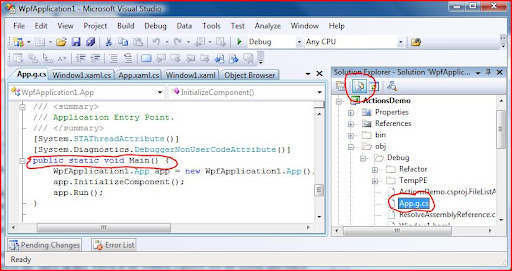
The main method in WPF application lies in the file App.g.cs located at obj\debug.This is autogenerated and will not be visible until we press the 'Show all files' button in the solution explorer.See the screen shot below.


Adding our own Main method in WPF applications
Now it is clear that the WPF application has a mainmethod where the execcution starts.Let's check whether we can write our own main method.If we write a Main method in the App.Xaml.cs it will not compile by saying "App already define a member called 'Main' with the same parameter types".So what to do?

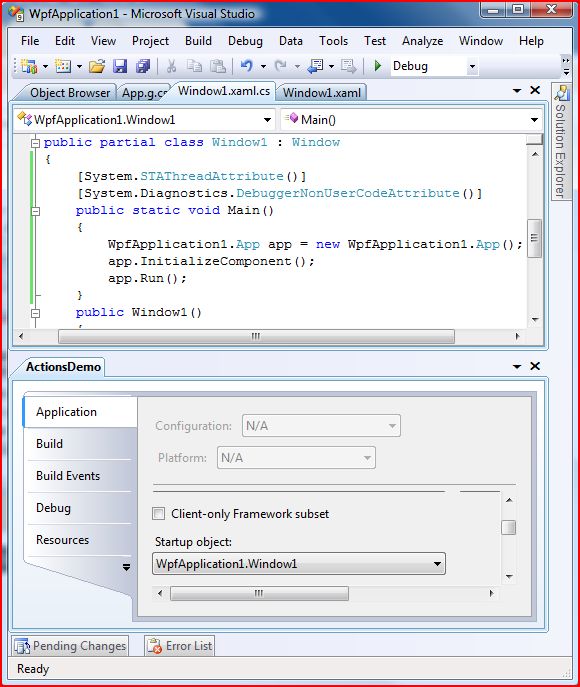
We can write in some other classes like Window1.xaml.cs.Then how the system identifies which Main should get called.That too simple.Go to project properties.Select application tab.Then change the start up object to Window1.cs.See the below code for more details

Friday, May 1, 2009

MVVM Resources

MVVM or M-V-VM is a new architecture like MVC and MVP ,which is more suitable for WPF and Silverlight which supports data binding .It stands for Model View ViewModel.Before reading further please have some idea in MVC (Model View Controller) and MVP(Model View Presenter) if you don’t have already.

Some links to MVC and MVP

MVC - The Official Microsoft ASP.NET Site
Design Patterns- Model View Presenter
Model View Presenter - Wikipedia, the free encyclopedia
http://www.codeproject.com/KB/architecture/ModelViewPresenter.aspx

What is M-V-VM

Model and View are same as in MVP and MVC.The only change is in the ViewModel. This effectively separates the model and view.Confused?Lets see what is this new View model ?

View model is a class which wraps data binding enabled view objects or properties and commands which drive the flow of the application.The properties contain what ever the view is supposed to display.These properties are designed based on the model.Commands are just WPF commands which implements the ICommand interface.They are executed by the user actions from the view.So they are normally associated with the buttons or other controls which implements ICommandSource interface.

Simply saying the view model loads the data which are to be displayed from model and displays through view by means of data binding.In the reverse direction it accepts user actions from view through commands and performs required actions on model.

In the ideal situation there should be no direct communication between view and the model.Everything should pass through the view-model.One more thing in ideal situation is views should not have a code behind.Have an image google using MVVM if you need a block diagram of this architecture.

Learning and designing MVVM architecture

Due to time limit ,here I am giving some links which describe MVVM in detail.Hope I can write more about implementation side later.At the first time you will feel that, this is very difficult to achieve.Scenarios such as ‘performing something on ListBox selection but it doesn't have a Command property which executes on selection’ and  ‘method to invoke a command on mouse over’ will come.But once you go through the below links you can find solutions for all these issues and go smoothly with MVVM.

Intro to MVVM by Josh Smith
THE MODEL-VIEW-VIEWMODEL (MVVM) DESIGN PATTERN FOR WPF

Using mediator pattern to implement communication among view models
[MVVM + Mediator + ACB = cool WPF App] – Intro « C# Disciples

Command invocation on any control any event
Applying Command Binding to any control and any event

Will be adding more as soon as I come across

Tuesday, March 31, 2009

DataBinding to App.Settings values

.Net 2.0 introduced this feature which helps to store and retrieve application specific settings very easily.You can easily create Settings through the visual editor.If we want to access them in code we can just use the Properties.Settings.Default object directly.The Default object will have all the properties which we had created at design time.
Showing ConnectionString entry in Messagebox
MessageBox.Show(Properties.Settings.Default.ConnectionString);


It is very easy.Lets learn how this can be binded in to a WPF TextBox.

First make a namespace reference to the Properties namespace.If your application name is WpfApplication1 it is xmlns:props=”WpfApplication1.Properties”.

Then in the Binding set source as the Default property available in the class Settings.Since it is static you have to use the x:Static binding extension.

Finally the path is ConnectionString which is the settings entry name.

Putting it altogether.


<Window
xmlns="http://schemas.microsoft.com/winfx/2006/xaml/presentation"
xmlns:x="http://schemas.microsoft.com/winfx/2006/xaml"
x:Class="WpfApplication1.Window1"
x:Name="Window"
xmlns:props="clr-namespace:WpfApplication1.Properties">
<Grid x:Name="LayoutRoot">
<TextBox  HorizontalAlignment="Left"  VerticalAlignment="Top"
Text="{Binding Source={x:Static props:Settings.Default},Path=ConnectionString}">
</TextBox>
</Grid>
</Window>


So enjoy WPF data binding to Properties.Settings.Default.

Tuesday, March 24, 2009

Writing custom Pixel shader effects.

What are Pixel shaders

Pixel shaders are programs which operates on each pixel before displaying in the screen.Pixel shaders are not part of Silverlight or WPF.They are more related to the Graphics cards and DirectX.They use a language called HLSL (High Level Shader Language) for programming.It has more similarities to C than C#.More details on HLSL is available here.

Coding Pixel Shader : Negative.Fx

Coding in HLSL refers some registers and all.Here is the code for a Negative Effect.

sampler2D implicitInput : register(s0);

float4 PS(float2 uv : TEXCOORD) : COLOR
{
float4 color = tex2D(implicitInput, uv);

float4 result;

result.r=1-color.r;
result.g=1-color.g;
result.b=1-color.b;
result.a=color.a;

return result;
}


We are getting the color value of pixel in float4 located at uv and returning a color (result)which is inverse of the given color.

Compiling a Pixel Shader

The extension of the Pixel shader files will be .FX.We need to have DirectX SDK installed in our machine in order to compile HLSL (*.fx) source code to *.ps bytecode that can be loaded using Silverlight’s PixelShader class. Fxc.exe is the HLSL compiler used to compile *.fx HLSL shader files. The following command shows how to compile Negative.fx:


Current folder : [Install drive]:\Program Files\Microsoft DirectX SDK (November 2008)\Utilities\bin\x86 (Change the month according to the version you have)


fxc.exe /T ps_2_0 /E PS /FoNegative.ps Negative.fx

/T ps_2_0 :Compiles against the ps_2_0 target pixel shader level that WPF currently supports
/E PS : Marks the function 'PS' as the entry point
/FoNegative.ps Negative.fx : Negative.fx as input and output to Negative.ps. Note that there is no space between /Fo and Greyscale.ps

The command above can be used as pre-build event of a Visual Studio project to automate the build process.


Creating Custom Shader Effect class


Add the output .ps file as Resource in the project.Once we add the .ps file we can start writing the .Net interface class for that.It is derived from the ShaderEffect class and we need to add some things there.See the below code.


public class Negative : ShaderEffect
{
private static PixelShader _pixelShader = new PixelShader()
{
UriSource = new
Uri("pack://application:,,,/WpfCustomEffect;component/Negative.ps",
UriKind.RelativeOrAbsolute)
};

public static readonly DependencyProperty InputProperty =
ShaderEffect.RegisterPixelShaderSamplerProperty("Input", typeof(Negative), 0);
public Brush Input
{
get { return (Brush)GetValue(InputProperty); }
set { SetValue(InputProperty, value); }
}

public Negative()
{
this.PixelShader = _pixelShader;
UpdateShaderValue(InputProperty);
}
}


PixelShader is the protected property in ShaderEffect class and that should be initialized with a new instance which refers to our .ps file.Then we creates a dependency property which is of type Brush and associates to the shader.Creating dependency property is a bit different here.We need to use ShaderEffect.RegisterPixelShaderSamplerProperty method in order to create the DP.


Using Custom Pixel Shader


We can use the new Effect from either XAML or C# code behind.


<Image x:Name="img"
Source="Autumn.jpg">
<Image.Effect>
<effect:Negative />
</Image.Effect>
</Image>
<Button Grid.Row="1"
Click="Button_Click"
Content="Click to change">
<Button.Effect>
<effect:Negative />
</Button.Effect>
</Button>


private void Button_Click(object sender, RoutedEventArgs e)
{
if (img.Effect == null)
{
img.Effect = new Negative();
}
else
{
img.Effect = null;
}
}


Sample can be downloaded from here.

Saturday, December 13, 2008

Creating custom wpf markup extension to show class fields

Here is one link which describes what is markup extension and available markup extensions.
Markup extensions are very much useful to obtain a clean project.Things won't get mixed with each other.Xaml itself contains the lines which have the functionality.

Consider the scenario where we need to display all properties of given class in a listbox.We normally write C# or VB code to get PropertyInfo objects and return the same.This code normally resides in presentation files itself.

Here comes the need for markup extension.We can write our own extension by inheriting from the MarkUpExtension class.

Steps to Create a custom markup extension

  1. Create a class which derives from MarkupExtension.The naming convention is that the class name should ends with 'Extension' .Eg:TypeDescriptorExtension
  2. If we need to accept a default parameter with extension write a constructor
  3. Add other properties as well.
  4. Override ProvideValue Method and return the appropriate value after processing.

Eg: Creating custom markup extension to list Properties and methods of a Class

The PropertyDescriptorExtension class is derived from Markupextension and it accepts an object Type as default parameter.So the constructor is written with a parameter of type 'Type'.

public class TypeDescriptorExtension:MarkupExtension
{
public TypeDescriptorExtension( Type type):this()
{
Type = type;
}
}

The other properties are IncludeProperties and InCludeMethods which are boolean to indicate whether the out put list should include Properties and Methods respectively.IncludeProperties is true by default.

Now override the ProvideValue method.Get the properties and methods collection based on the properties using Reflection and return as well.

public override object ProvideValue(IServiceProvider serviceProvider)
{
if (Type == null)
{
throw new InvalidOperationException("The Class must be specified.");
}
List<string> items = new List<string>();

if (IncludeProperties)
{
foreach (PropertyInfo item in Type.GetProperties())
{
items.Add(item.ToString());
}
}
if (IncludeMethods)
{
foreach (MethodInfo info in Type.GetMethods())
{
items.Add(info.ToString());
}
}
return items;
}

Using the TypeDescriptorExtension
Normal, which displays only properties

 <ListBox ItemsSource="{Binding Source={local:TypeDescriptor {x:Type Button}}}" />
Displays methods only
 <ListBox ItemsSource="{Binding Source={local:TypeDescriptor {x:Type Button},IncludeMethods=True,IncludeProperties=False}}" />

Sample is available here.

Wednesday, September 10, 2008

Syntax of Path.Data

When we create drawing Paths in blend it gives us the Data in a special format with some letters which is not easily understandable at first look.
Here is a link which describes how the control letters M ,C, L etc are getting mapped.
http://msdn.microsoft.com/en-us/library/ms747393.aspx#paths

One more link to create paths simply using individual objects.
http://msdn.microsoft.com/en-us/library/ms745814.aspx

Friday, May 11, 2007

Prototype of Next gen 3D Desktop using WPF

A model of windows desktop which may arrive in the near future using the WPF technology

Thursday, May 10, 2007

Difference Vector graphics & Raster graphics

Raster graphics stores the image as pixel array and when resizing it resizes that image.Quality loss is the result like photoshop resizing.
Vector graphics stores the image as data (how to draw an image) and scales that data and draws when needed .So no quality loss.

Wednesday, May 9, 2007

How to know the current rendering mode of WPF application?

Check the value (System.Windows.Media.RenderCapability.Tier >>16 ) .Results are given as follows
  • 0-Software rendering
  • 1-Partial rendering
  • 2-Hardware rendering

According to this we could load different Resources(which contain styles & templates) in order to maintain same performance in different machines.

Thursday, May 3, 2007

Advantages of WPF & .net3

Some advantages of WPF ,I found while working with WPF
  1. Cool applications in less time.
  2. Effective use of Graphics card.Highly suitable for high end /upcoming computers.
  3. We can create 3D scenes very easily.(Using ViewPort3D)
  4. Databinding
  5. Built in Animation
  6. Templates & Styles
  7. Resource management
  8. Content control mechanism.
  9. XAML(Designer and developer can work independently)
  10. XBAP
  11. Silverlight (WPF/e)
  12. Same programming model for windows & web
  13. Retained mode graphics (No need to draw in the OnPaint event.Everything automatic)
  14. Supports most of the media/document formats natively

Disadvantages

  1. WPF/e doesnt have support to add controls in it.Hope they implement it soon.
  2. We need to go for another software (Blend)if we want to design a good looking interface.VS should have all the facilities what Blend does now.
  3. No MDI child mode.

Friday, April 20, 2007

Vista theme support in XP using WPF

This wont change the look and feel of the Window as in Vista ie the transparent window title.But changes the look and feel of the elements (Button,Combo etc) inside that Window.

http://blogs.msdn.com/llobo/archive/2006/12/13/Vista-look-on-Non_2D00_Aero-themes.aspx