Thursday, July 23, 2015

WPF is dying - Time to focus on HTML+Javascript+CSS based desktop development

"Long long ago when browsers were only used to show documents and text delivered from servers, there was a technology called Silverlight which was released by Microsoft to compete with another technology called Flash. Flash was used to add some flashy animations into static web contents and to play video and audio files..."

This must be a story I will be telling to my son when he wants me to tell technology stories. As everybody knows Silverlight is now dead though Visual Studio 2015 is still giving project template. I was one of the developers who learned and developed from the very first preview version of Silverlight itself. Also successfully run a blog called Silverlighted Web and earned so much money with my Silverlight skill. What caused SL to die? 

It was simple as the gap was filled by HTML5. Silverlight / other RIA technologies were kind of workaround to achieve Rich Internet Apps because HTML, till 4th version was just for content / document markup, not for applications. Once HTML5 came with capabilities to develop applications , obviously RIA technologies were all dead including Silverlight, Flash etc...At least in case of Flash , Adobe announced officially and provided migration to HTML5. MSFT is still not announced SL is dead.

When HTML5 arrived, smart people foresee the death of Silverlight and moved to HTML5. But there were still people who believed SL will live longer and MSFT will invest on it because their Azure Portal was using Silverlight. Microsoft is a group of smarter people than us and all of a sudden they launched their Azure portal in HTML5 and slowly ditched Azure SL portal.

Lets come back to WPF. There were speculations on WPF is going to die when Microsoft first announced that we can build Windows 8 desktop apps using HTML5 & Javascript. There were people who argued MSFT won't kill WPF because Visual Studio & Expression Blend are built using WPF. There is a road map published in .Net MSDN blog as well. According to me there are less chances that anybody will maintain a technology only because of one product.

Yes, Microsoft cannot rewrite Visual Studio using other technology between 2 versions as its desktop application and there are many plugins out there. It was different with Silverlight based Azure portal as it was web, single instance and nobody had written plugin on top of it.

Am I telling that Visual Studio is rewritten using some other technology which eventually kill WPF

Yes it is happening, but as small pieces here and there. First Visual Studio Online came. We can use it to manage our TFS projects. We can do all most all the project management activities which we were doing from VS desktop app. Only thing pending is writing code, compiling & debugging. People can argue VS desktop is for coding and debugging only. So what is the problem?

The big thing happened during the Build 2015. MSFT announced something called Visual Studio Code. What is it and what is it for WPF?

According to wiki, it is a source code editor for Windows and Linux and OS X. What is the distance between source code editor and IDE? Its simple as Compile, Run and Debug capabilities. That can be done using VS Code also. They says its "Code Editing. Redefined". Why they call it as VS Code? Why the existing Visual Studio is not enhanced to 'redefined code editing'? Why they are calling it as VS Code, a separate name? Is it only because, it can run on other operating systems such as Linux and OS X.

According to me, MSFT is once again showing that HTML+Javascript+CSS is the future by introducing a Electron based Visual Studio. Don't get shocked on hearing the new redefined code editor aka Visual Studio from MSFT is based on Electron  which is an open source cross platform technology for desktop application development using web technologies(HTML,Javascript) from Github which depends on Chromium. Yes the same technology powering Chrome browser from Google.

Electron has high degree of customization (hackable to the core) as an editor. Chromium is really stable with its multi process model. Its all proven and now we can see, VS Code download link in the VS 2015 page.

Is there any more proof required to understand, HTML5 based VS Code will replace existing WPF based Visual Studio? We probably will see VisualStudio online providing us a web page where we can write code, compile and debug in next 5 years along with its current project management features.

Will .Net platform survive the boom of Javascript and Microsoft's journey to become hosting company? Will write another post on the same

This will be my last post on this WPF technology blog. This is the blog I will surely write posts on WPF as and when I encounter interesting scenarios. But those will be published in my General Technology Blog.

Joymon v/s Code

Don't argue that I am writing all these because I want to focus only on one blog. It doesn't make any difference posting here or there.

Thursday, July 31, 2014

MVVm views without C# code behind file

The MVVm is a great technique for separating the concerns. If we take ASP.Net MVC we can see it is built for using model view controller model. So by default wont allow us to write code behind for the views (We can write inside the cshtml though). But WPF as the technology was not built to use WPF to there is no in-built way to avoid the code behind of views. 

If the development team is so technology focused, it doesn't matter as they won't break the rules of MVVm even if there is code behind file. But since companies are offshoring to get cheap labor, enforcing quality is little tricky. As always cheap things comes with less quality. Most of the time people's priority is to get things done in quick way ie by writing everything in code behind instead of going through viewmodel. 

The challenge here is how to bring quality with these less skilled labor? One of the way to enforce viewmodel  usage is to delete the code behind of views which is nothing but the user controls.

If we just remove the usercontrol.xaml.cs, it will fail as the Initialize method is missing. So how to overcome is?

Add the Initialize method in the view itself. Yes we can write C# code in XAML. So the view user control will look as follows.

<UserControl x:Class="Joymons.MVVmDemo.Views.MainView"
            xmlns="http://schemas.microsoft.com/winfx/2006/xaml/presentation"
            xmlns:x="http://schemas.microsoft.com/winfx/2006/xaml"
            xmlns:mc="http://schemas.openxmlformats.org/markup-compatibility/2006" 
            xmlns:d="http://schemas.microsoft.com/expression/blend/2008" 
             mc:Ignorable="d" 
             d:DesignHeight="300" d:DesignWidth="300">
    <x:Code>
        <![CDATA[ public MainView() { InitializeComponent(); }]]>
    </x:Code>
            <TabControl ItemsSource="{Binding ChildVMs}" SelectedIndex="0">
                <TabControl.ItemTemplate>
                    <DataTemplate>
                        <TextBlock Text="{Binding Header}" />
                    </DataTemplate>
                </TabControl.ItemTemplate>
            </TabControl>
</UserControl>

I too started using VS 2013. That is why a black background in the code :)

Thursday, July 3, 2014

Binding Viewmodel property to tabitem header in MVVm pattern

Its been a while since I started a WPF project from scratch. I was mainly into the architectural side of application rather than UI side. Today I got an opportunity to start one app. It is supposed to be simple WPF application where the screens are arranged in hierarchical tabs.

The application is supposed to be a temporary application which will be used to test an algorithm developed by the business before its getting integrated into the actual application. So thought of not following the MVVm pattern as its supposed to be developed from our offshore in less amount of time. But one discussion with my lead architect changed my decision. If we are doing something we should do it right. We don't know whether the client will get rid of the application if it feels too good for them. Finally decided to go with MVVm.

The initial decision I had to take about the MVVm infrastructure. Earlier when I used to start the project I take my own RelayCommand,ViewmodelBase classes. That was the beginning time of WPF. But this time I decided to use a good library on the assumption that the MVVm framework must be matured by now. It ends up in using MVVM Light. Its a nice library which we can get from nuget.

Then started thinking about the UI structure where the tabs needs to be shown in hierarchical way. Its nothing but there will be one parent level tab control and in every tab page there will be one more tab control. I created the view models and bound to the view. Each high level view model have ChildVMs collection. In the MainPage.xaml UI I was able to bound to the ChildVMs property and they showed up as each and every viewmodel was associated with data template.

    <Application.Resources>
        <DataTemplate DataType="{x:Type vms:ChildViewmodel_1}">
            <vws:ChildViewUserControl_1/>
        </DataTemplate>
    </Application.Resources>

But I faced one problem. I could see that the tab headers are also showing the same control which is inside the tab page. Ideally I need to edit the tab header template and bind to the header property in the viewmodel. But I could see one more way which is just a data template for the tab item.

        <TabControl ItemsSource="{Binding ChildVMs}">
            <TabControl.ItemTemplate>
               
                <DataTemplate>
                    
                    <TextBlock Text="{Binding Header}" />
                </DataTemplate>
            </TabControl.ItemTemplate>
        </TabControl>

Happy coding

Wednesday, July 18, 2012

Index - Important WPF concepts & features

Recently, I came across a scenario where I had to explain the WPF features to one person. I didn't get a common place where I can see a list of all WPF features. Now I would really like to call this as WPF cheat sheet where I can brush up my WPF skills.
The sad thing I could forecast is, as the WinRT model becomes popular and available in different platforms such as WinRT tablets, surface, windows mobile, Windows 8, future OS and other devices etc...,WPF will decline to desktop computers and rest in history. After naming the tablet as Surface, it seems Microsoft is trying to bring single platform for all devices under the Surface brand same as Google did using Android. Hope you got why I wrote this index post.

Wednesday, June 20, 2012

Drag and drop files from WPF to desktop using C#.Net

This is not only applicable to WPF but also to Windows forms applications. When I meant desktop it applies to any folder opened in windows explorer. ie the folders which we interact with for drag and drop. The scenario here is simple. We have a remote file system accessible via WCF services and showing the files and folders in the front end WPF app. It has options to upload ,download,check-out, check in etc…As part of improving usability we decided to give drag and drop facility to the screens.

Some facts about .Net drag and drop
Here are the facts about .Net file drag and drop. We cannot manipulate the file contents during the drag operation. It works only with physical files. ie we should give the drag and drop system a physical file name to start drag and drop into windows explorer or desktop. May be one reason is once the dragging mouse leaves the .Net application it is controlled by the native system ie the windows.


The drag and drop design
The above facts tells us that we can only imitate a file drag start just like it is started from windows explorer. So we should design accordingly and it is simple. As long as the .Net file drag and drop works only with the files, we should download the file before we call the DoDragAndDrop method. Is it good to download when the user starts dragging? No.So give an indication that the file is being downloaded to the client side repository /cache /temp location and allow dragging on the files which are downloaded fully.
The attached sample contains code which puts a in-memory file entity to temp folder when the dragging starts and routes the source of dragging to the file which is created in temp.

When should I call DoDragDrop
I had tried from so many places and succeeded when I called from PreviewLeftMouseButtonDown. This will block all the other operations on the mouse down operation context.


Code to drag and drop to explorer
If you look at the same you will get a clear idea how I achieved this .The FileEntry is just a class to hold the data and file name. Upon mouse event I wrote to a temp location and starts dragging using that file path. ie simply initiating a drag which we do among normal windows explorer windows.
private void Grid_PreviewMouseLeftButtonDown(object sender, MouseButtonEventArgs e)
{
    FrameworkElement senderElement = (sender as FrameworkElement);
    if (senderElement != null)
    {
        FileEntry file = senderElement.DataContext as FileEntry;
        if (file != null)
        {
            string fullPath = Write2TempAndGetFullPath(file);
            //TODO : If you want to delete you need to use FileWatchers to catch the drop events and delete from temp.
            //But as long as it is temp the users/admins can delete it when required.
            DataObject dragObj = new DataObject();
            dragObj.SetFileDropList(new System.Collections.Specialized.StringCollection() { fullPath });
            DragDrop.DoDragDrop(senderElement, dragObj, DragDropEffects.Copy);
        }
    }
}
private string Write2TempAndGetFullPath(FileEntry file)
{
    string tempFilePath=System.IO.Path.Combine(_tempFolder,file.FileName);
    Stream fs=File.Create(tempFilePath);
    new StreamWriter(fs).WriteLine(file.FileContents);
    fs.Close();
    return tempFilePath;
}


Clearing temp
If you respect the word TEMP ,there is no need to worry about clearing the temp folder because that is temporary and users or admins are allowed or trained to clean that folder whenever they need more hard disk space . If you agree with me go ahead and concentrate on your application and leave the temp to users. Else ie if you are particular about cleaning temp follow the below link which employees a file watcher to clean the temp immediately after the file is dropped.

http://www.codeproject.com/Articles/23207/Drag-and-Drop-to-Windows-Folder-C

Sample
Download the sample from this link

Friday, February 24, 2012

MVVm - Embed C# code in XAML like ASP.Net MVC

It is long time since I posted something in this blog. I know this is my most famous blog with average 200hits/day but I was mainly concentrating into the other aspects of .Net such as CLR, WCF, ASP.Net, Windows Phone 7 etc than this XAML based display technology. There are 2 main inspirations for this post.

First one is a comment which I got on my post related to opacitymask and its usage in WPF. The specialty of that is, it came from a MSFT guy. I don't know how others are thinking, but for me its little important. Even I am not sure whether that MSFT is just something else or that person just added MSFT :-)

The second reason is "This is my 100th post on WPF technology and I want that to be something special and useful". I was in search for such a topic and just found today, while I was working with ASP.Net MVC 3 application.

The problem
Anyway I am not wasting time on introduction.Lets come to the topic. As everybody knows MVVm is the widely accepted pattern for the XAML based technologies such as WPF and Silverlight. The main reason I could see is the data binding support. By design the pattern is not expecting anything in the code behind and everything related to business should reside in the viewmodel. Its all fine.We can have data binding and commands to separate the view from vm. But what can I do with the dialogs? Since they are UI is that desirable to call showdialog from viewmodel or should I write code behind for views and pass the dialog result to vm through event aggregator or any other messaging mechanism? Mainly this comes into picture when we need to browse for a file or show a messagebox in MVVm based application.

There are something called behaviors and triggers in an expression blend dll named System.windows.interactivity which we can leverage to accomplish the same. But are there any better way? Yes another way is to call the ShowDialog from the vm itself and process it. This is what I was following till I came to play more with ASP.Net MVC pattern.

What is special with ASP.Net MVC
MVC is another UI pattern to separate the UI from its business. When Microsoft implemented a framework to write asp.net applications using the same, people started calling it as ASP.Net MVC. Actually there is no relation between ASP.Net and MVC .Anybody can implement MVC in their application without MSFT framework.

The specialty I noticed in MVC framework is, there is no option to write code behind. In the RAZOR view we cannot even find a code behind file. I wondered how people are accomplishing their tasks without writing the code behind for views. Theoretically we can say "don't write code behind" .But I have never seen a big enterprise application in MVVm without code behind for at least one view.Coming back to ASP.Net MVC, the RAZOR don't give us option to write code behind but provides support to embed code inside the view itself.
Yes the idea flashed in my head and I could recollect one of my old post which explains embedding code    inside the xaml file .That is the way to handle the dialog boxes better.

Solution : Embed C# or VB.Net code in xaml view
This doesn't mean we should move the code behind file into the view. This helps to write the dialog handling code in the view itself. Below is one example of such an implementation.


    <Grid>
        <Grid.ColumnDefinitions>
            <ColumnDefinition Width="*" />
            <ColumnDefinition Width="Auto" />
            <ColumnDefinition Width="Auto" />
        </Grid.ColumnDefinitions>
        <TextBox x:Name="txtFileName"
                 Text="{Binding FilePath,UpdateSourceTrigger=PropertyChanged}" />
        <Button Grid.Column="1" Content="Browse" Click="Clicked" />
        <x:Code>
            <![CDATA[
void Clicked(object sender, RoutedEventArgs e)
{
            Microsoft.Win32.OpenFileDialog ofd = new Microsoft.Win32.OpenFileDialog();
            ofd.DefaultExt = ".exe";
            ofd.Filter = "Executables (.exe)|*.exe"; // Filter files by extension

            // Show open file dialog box
            Nullable<bool> result = ofd.ShowDialog();
            // Process open file dialog box results
            if (result.HasValue && result.Value)
            {
                // Set value to textbox which will update the property of VM
                txtFileName.Text= ofd.FileName;
            }
}
]]>
        </x:Code>
        <Button Content="Start"
                Grid.Column="2"
                Command="{Binding StartCommand}" />
    </Grid>

Pros and Cons
One thing to notice is that we need to give name to the controls which other developers may use to write code behind.Next thing how to show a message dialog box in this way .For that we need to keep a property in the vm and bind to a hidden textbox . Wire the TextChanged event of textbox to an event handler in the view as how the above C# code is written .
Main development challenge will be how to write code without intellisense .Yes you don't get intellisense when writing code inside xaml file.One way to overcome is to write the code in normal file and copy paste.

Sunday, September 18, 2011

Monday, August 8, 2011

How dependency property internally works? A MUST read for WPF and Silverlight developers

A good article which I though of writing when I started WPF. This describes how dependency property concept is implemented on top of .Net 2.0 framework without even adding a .net language keyword.

http://www.abhisheksur.com/2011/07/internals-of-dependency-property-in-wpf.html
A MUST read for WPF and Silverlight developers before they actually write code for clients.

Sunday, March 20, 2011

Open source WPFInspector

Another Snoop like debugging tool for WPF.But this is useful to debug and inspect DataContext,Resources,Triggers & Styles.

I don’t want to compare this with Snoop.Check it out yourself !!!

http://wpfinspector.codeplex.com

Monday, December 6, 2010

Technology v/s Concepts and architecture

First of all this is not a WPF technology post.I posted this in my WPF blog since it has some relation with WPF.ok let’s start.

Technology here means the implementation languages or mediums for a programming solution such as WPF, Silverlight, Linq,WCF etc…While taking interviews, I have often heard that “I can learn or work in any technology since I know concepts and architecture”.Mostly this is the answer from a candidate when we ask “Do you know WPF or are you able to work in Silverlight?”. Some of my friends,they don’t even ready to rate themselves in the technology.If we ask them how do you rate yourself in WPF out of 10? they will say I am strong in concepts so I can do whatever work assigned to me in WPF.

If we think from an entrepreneur perspective this cannot be accepted every time.A person cannot estimate the work in WPF without the knowledge in WPF whatever strong he is in programming concepts and architectures.Also if the work in WPF or Silverlight is critical companies cannot rely on the statement “I know concepts and architecture”.Lets take one example to prove this.

The driver selection story

You are working in Cochin and on a Friday your CEO decided to go Chennai to attend an important meeting on Saturday.There are no tickets in flights and trains since the trip is decided suddenly.So he decided to go by his new highly sophisticated BMW car.He needs some body with him to drive the whole 700 kilometers since he need to attend the meeting with freshness.

There are 5 persons who are free in the week end and ready to accompany CEO.The first person, lets call him A said I have license but have no experience.Person B said I have license and have experience in riding motor cycle.Person C said I had driven my father’s truck.Person D said I have my own car which I am usually driving to come office.But its a 10 year old model.Person E said my uncle owns the same BMW model of yours and I usually drive it in the week ends and holidays.Who will accompany your CEO? obviously person E provided your CEO is smart :)

The case of Person A can be compared like a network guy saying I can do WPF.Person B is like a assembly language programmer saying I can do the WPF without training since I know basics an experience in programming.The case C can be compared as a Java programmer applying for WPF job saying that I am strong in OOPS.The D is like a .Net 1.0 programmer saying I can do WPF since all are .Net.E is the real one who knows WPF.Persons A,B,C & D can do the job provided they get certain time to familiarize the new car and its features.But since the time is limited nobody can be considered for the position.

Do I need to give more importance on technology?

The technology is getting importance over architecture depends on the situation or the demand.If we think from employer perspective ,he needs a technology guy if the work in particular technology is so critical and should be done in time.He don’t have time to give training to the guy he hires. If the requirement is for future project, the choice should give to the guys who are strong in concepts and architecture.Again that depends on the available time.If a WPF project is supposed to come on next month ,.Net guys can be hired and they can get training in WPF.If the time gap is 2 months JAVA or even assembly programming guys can also be included.

Coming to the developer perspective ,he should find some time to the technology as well while learning the architecture.Also while learning technology, learn the technology by comparing with the previous one.Main important thing to consider is “why I should learn a new technology ?”.I know some of my friends doing WPF /Silverlight projects without using data binding.Also they are simply creating controls when and where needed without changing templates.I asked why are you using this technology ? They simply replied “My company/client wants this project to be done in WPF”.

The moral of the story is “Learn technology before architecting your application and get benefits from it’s features”.

Sunday, August 8, 2010

Common Code Base 3 handling controls

Another issue you are going to face is the namespace and assembly differences of classes in WPF and Silverlight.Especially you will find when dealing with controls.ie the classes will be there with same methods and properties.But in different namespaces or assemblies .That prevent us from having common code base.

Lets just consider the case of TreeView in System.Windows.Controls namespace which is present in both WPF and Silverlight.In WPF it is in the assembly PresentationFramework.dll but in Silverlight its System.Windows.Controls.dll. Ideally the schema mapping should do the correct mapping and we should be able to use the xaml. But unfortunately it is not mapped to the schema.Means if we use common xaml file for tree view it will show a compilation error in Silverlight.

The tag 'TreeView' does not exist in XML namespace 'http://schemas.microsoft.com/winfx/2006/xaml/presentation'.

Does this indicate we should stop common code? Not at all.We have one solution which uses inheritance as a hack.I didn’t even think, inheritance will have such a usage.Solution is as follows.

  1. Create your own class for TreeView by inheriting the framework TreeView.Have this linked to WPF too.
  2. Use your treeview throughout the application.
Public Class CCBTreeView
Inherits System.Windows.Controls.TreeView
End Class


CCBTreeView would be in your controls project which refers PresentationFramework.dll and System.Windows.Controls.dll in WPF and Silverlight respectively. While using, use as follows.


<UserControl x:Class="TestCompatibility.MyControl"
xmlns="http://schemas.microsoft.com/winfx/2006/xaml/presentation"
xmlns:x="http://schemas.microsoft.com/winfx/2006/xaml"
xmlns:CCBControls="clr-namespace:CCB.Controls;assembly=CCB.Controls">
<CCBControls:CCBTreeView ItemsSource="{Binding Persons}" />
</UserControl>


This applies to so many controls such as HierarchicalDataTemplate,TabControl etc which differs in namespace or assembly.Refer the sample uploaded here if you still have confusion.Also let me know if anybody have better solution to this problem.

Previous posts on Common Code Base

----------------------------------------------

Common Code Base 1 Introduction

Common Code Base 2 Styles and Templates

Saturday, August 7, 2010

Debugging WPF and Silverlight DataBinding

Good article about debugging data binding in WPF and silverlight.

http://blogs.msdn.com/b/wpfsldesigner/archive/2010/06/30/debugging-data-bindings-in-a-wpf-or-silverlight-application.aspx

In short we can debug databinding in 2 ways

  1. Looking at the output/immediate window.
  2. Using converters.
  3. Putting break points in get and set regions of properties

Sunday, July 4, 2010

Common Code Base 2 Styles and Templates

As everybody knows Silverlight doesn’t support the Triggers which are most common in WPF.That means we cannot use WPF styles as it is.So obviously we need to create new styles even for Silverlight 4 which are same in behavior but using different xaml.Below are the best practices which we can follow to tackle the styles and templates in Common Code Base  scenario.

  • Don’t write any inline styles.Use resource dictionaries.
  • Merge the resource dictionaries at the application level only.

This will solve the issue with basic styles.Think of a scenario where you are loading the styles dynamically.In WPF you can handle this using DynamicResource binding extension.But the sad thing is Silverlight doesn’t support DynamicResource. So what is the solution.
The solution which we applied was very easy.Use StaticResource in the XAML files and load the styles through code in the App.xaml.vb file.Yes it worked in WPF too.
Download sample from here to see the styles and templates in action in CCB.(See the foreground of Button.Its coming through Style)

Previous posts on Common Code Base
----------------------------------
Common Code Base 1 Introduction

Thursday, June 17, 2010

Calling WCF service without AddReference

One of my Silverlight blog post is about creating a proxy without using the add reference menu in the Visual studio.The solution there is to write all the code which is auto generated when we add the reference through the proxy.ie we are just avoiding the auto generation and writing ourselves.Not a good solution.The reason we need to write all is because Silverlight supports only the Async service calls.But if we consider WPF we can call the service in Sync way.That means we can try out new things which will reduce our works in creating the manual proxy.

Didn’t get anything? In short we are going to create a proxy and call service without using the Add Service Reference menu or the any of the tool (eg:svcutil)available for generating the proxy.How can we achieve that.It’s simple .Share the contract dll.Important thing here is the sharing of contract dll is possible only because WPF and the WCF is using the same framework and runtime.This will not be possible in case of Silverlight since the runtime is different.

Ok.Lets start.We need 3 projects mainly.One is the Contracts where we keep all the WCF contracts.Then a service host project and a consumer of services.In the attached sample the host is a web host and the consumer is a WPF application.We can also host the WCF service in ConsoleHost.But in that case we need to solutions.Thats why I decided to go with WebHost.Below is solution structure.
Note that there is no ServiceReference in the WPF UI project.Only thing is the reference to Core project which contains all the contracts.App.Config should be same as of normal proxy creation in case you want to use default connection settings.All the magic happens inside the ServiceProxy class which is inheriting the ClientBase with a generic class.It will be clear after seeing the code below.
Imports System.ServiceModel
Imports ManualProxyTest.Core
Public Class ServiceProxy
    Inherits ClientBase(Of IMyService)
    Implements IMyService
    Public Function GetData(ByVal value As Integer) As String Implements IMyService.GetData
        Return Me.Channel.GetData(value)
    End Function
    Public Function Divide(ByVal no1 As Integer, ByVal no2 As Integer) As Double Implements IMyService.Divide
        Return Me.Channel.Divide(no1, no2)
    End Function
    Public Function GetChar(ByVal data As String, ByVal position As Integer) As Char Implements IMyService.GetChar
        Return Me.Channel.GetChar(data, position)
    End Function
End Class


For calling the service just create the instance of ServiceProxy and call as usual.Main advantage is the cleanliness in the code and we will have full control over the code.

Saturday, June 12, 2010

Common Code Base 1 Introduction

The thoughts on common code base or single code base for both desktop applications and internet applications has been started with introduction of C# in Silverlight 2. That brought not only the same design and coding languages into WPF and Silverlight but also the same APIs.

Same coding language was used earlier too.It was for Windows forms and ASP.Net.Even we were able to share the assemblies among them.But we were not able to create same application layer for them since the APIs and the design mediums were different.As time evolves Microsoft introduced the concept of XAML and made almost all the APIs same.

As everybody knows still Silverlight is the subset of WPF even in its 4th version.There are so many classes and members missing in Silverlight if we compare with the WPF equivalent.Does that means we cannot go for the common code base?

No.We can go for the approach of common code base as of now.But you cannot have certain WPF specific features in your application.Do your client allows that ? absolutely not.So we need to tackle that situation by providing WPF specific features in the desktop release.That means the road to the single code base is not that much easy as you think. So what is the simpe solution?

The solution is very easy.Develop your application against Silverlight excluding Silverlight specific features such as DeepZoom and compile the same code for WPF.It should work.I am saying this should work because most of the Silverlight classes and their members are available in WPF as same.

This will work if you are developing a simple application without WPF specific features.If you want to use WPF specific features you need to architect your application in such a way that it is following MVVm strictly.MVVm will allow you to switch the views very easily without changing the underlying layers.

Solution structure.

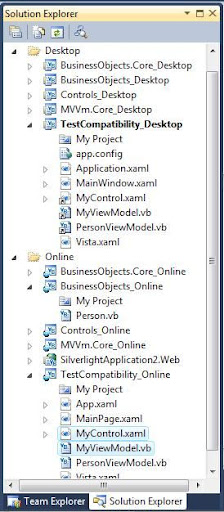
Develop against Silverlight then it will work in WPF. We need to remember this thing while creating the visual studio solution structure.So first create the Silverlight projects and keep the code and xaml files there.Then create WPF projects and link the files from Silverlight project location.Easy..What ever feature you implement in Silverlight or the fixes you do will reflect in WPF application too.

Look at the files MyControl.xaml and MyViewModel.They are real files in the Online solution and linked in Desktop project.

Issues

First issue you may encounter is XAML incompatibility.In WPF when we create a xaml style you normally specify as x:Type Classname.But this x:Type is not at all supported in Silverlight. Silverlight needs just the class name without x:Type .If you look at some of the controls like TreeView ,In WPF this resides in the PresentationFramework dll but in Silverlight it is in System.Windows.Controls.dll so we cannot have same xaml shared between WPF and Silverlight projects.There are so many issues like this.Will discuss about one by one in subsequent posts to make the real common code base.

Sunday, June 6, 2010

WPF 3.5 Bug in inheriting DataTemplate

You can easily reproduce the bug.Just inherit the DataTemplate and use the new DataTemplate class instead of default.You will get an runtime exception.

Your DataTemplate class

public class MyDataTemplate :DataTemplate
{
}


Nothing unusual rite? Then use this DataTemplate in your XAML.

<ListBox x:Name="lstPersons" >
<ListBox.ItemTemplate>
<local:MyDataTemplate >
<StackPanel>
<Button Content="{Binding Name}" />
</StackPanel>
</local:MyDataTemplate>
</ListBox.ItemTemplate>
</ListBox>


Just using the new class.But when we run this we get the exception as follows.


StackPanel' object cannot be added to 'MyDataTemplate'. Object of type 'System.Windows.Controls.StackPanel' cannot be converted to type 'System.Windows.FrameworkElementFactory.

This is true same in the case of HierarchicalDataTemplate too.

This is an identified bug.Microsoft has fixed this and WPF 4 contains the fix.

Friday, April 9, 2010

Getting ListBoxItem from selected entity

There will be some scenarios where we need to get the object of ListBoxItem which is hosting one of the the bound entity.Most probably it may be the SelectedItem.

Consider this scenario there is an business class called Employee and it’s collection class is EmployeeCollection.We have binding which binds object of EmployeeCollection to a ListBox.If we access the SelectedItem property of ListBox it will return the Employee object.But the requirement is to get the ListBoxItem which hosts the selected entity on an event say SelectionChanged.

Dim lbi As ListBoxItem = lstBox.ItemContainerGenerator.ContainerFromItem(lstBox.SelectedItem)


The above code can be used to get ListBoxItem of any object which is present in the collection.

Wednesday, April 7, 2010

Why WPF ProgressBar is not updating

When you put a loop and try to update the ProgressBar from that loop, it will not update the visual.The visual will update only after the execution of the loop.ie you can’t see the incremental animation.Here is the solution for that issue.

Private Sub btn_Click(ByVal sender As System.Object, ByVal e As System.Windows.RoutedEventArgs)
IncrementContinuously()
End Sub
Sub IncrementContinuously()
For i = 0 To 50
Thread.Sleep(100)
prgs.Dispatcher.Invoke(New CrossAppDomainDelegate(AddressOf IncrementBy1), DispatcherPriority.Background, Nothing)
Next
End Sub
Sub IncrementBy1()
prgs.Value = prgs.Value + 1
End Sub


This link contains some more solutions.

Tuesday, March 9, 2010

MCTS in WPF

It was my great ambition to clear WPF exam and became a MCTS from the day I started developing in WPF.Yesterday I achieved that.After getting the certification I was just thinking what are the benefits of taking such a certification? Even one of my colleague asked me what you are going to earn by writing these exams? Is it just because company is paying me the fees?

Absolutely no.There are some benefits as a developer.One is “We will get full coverage of WPF”.Second we gets some sort of “recognition in the community” .Third ,we can have the MCTS logo in our resume.The last benefit is our certification will help our company to get or retain partnership with Microsoft.

I don’t care about the last 3 points .Normally people does certification for that.If you elaborate the first point we can see the real benefit of certification.The coverage I meant is about the different areas in WPF.The certification includes all most all areas of WPF including 3D. Even if a person is working in WPF from the beginning, the chance for him to work in 3D is very less.That means he may know anything about 3D programming which is a great feature in WPF.By going for certification he needs to have a little knowledge about 3D programming in WPF using ViewPort3D,Camera etc…

Even I learnt different usages of documents only because of the preparation for the MCTS Exam.So try to get certified in the technology and move smoothly in the fast moving tech world.

Monday, February 1, 2010

Type safe INotifyPropertyChanged

Usually we pass the property name as string from the setter of properties and raise the INotifyPropertyChanged.PropertyChanged event.This is not type safe as you.There are chances that the end developers may misspell the property name.The below link gives a great idea to make your OnPropertyChanged calls type safe.

http://mfelicio.wordpress.com/2010/01/10/safe-usage-of-inotifypropertychanged-in-mvvm-scenarios/